Tech Pi
A full-stack developer community for sharing technical content, tutorials, and AI-powered tools.
- Java
- Spring Boot
- MyBatis-Plus
- MySQL
- Redis
- Elasticsearch
- MongoDB
- RabbitMQ
- Docker

TechPi is a full‑stack web platform featuring front‑end/back‑end separation, designed for developers to share and discuss technical content. It includes articles, tutorials, and AI‑powered assistants to foster faster growth, learning, and community engagement. The system built using a tech stack that includes Spring Boot, MyBatis-Plus, MySQL, Redis, Elasticsearch, MongoDB, Docker, RabbitMQ, and other technologies.
Check sections below to learn more about the implementation details for specific topics:
- Snowflake‑based ID generation system
- Data synchronize between MySQL and Elasticsearch using Canal
- User activity ranking system
- Sensitive word filtering system
Snowflake‑based ID generation system
Snowflake algorithm core properties:
- Global Uniqueness: No duplicate IDs should ever be generated.
- Trending (Roughly) Increasing: Especially important for MySQL InnoDB, which uses clustered indexes based on B-trees. Sequential IDs help ensure high write performance.
- Monotonic Increase: Useful in cases such as versioning or message ordering — the next ID must always be larger than the previous.
- Obfuscation & Security: Sequential IDs are predictable. If exposed (e.g., as order numbers), they can be exploited. Sometimes you need IDs that are non-sequential or randomized.
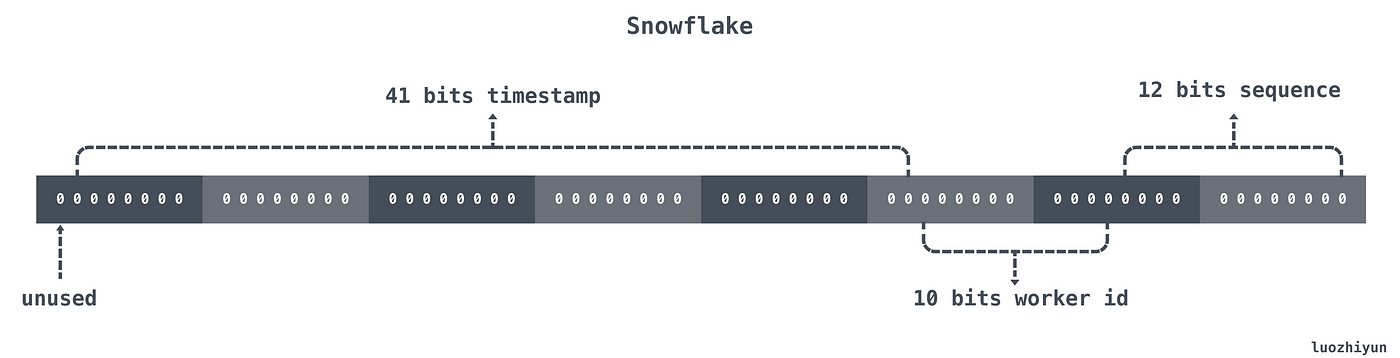
Snowflake uses a 64-bit long to store an ID composed of 4 parts:
- Sign Bit (1 bit): Always 0 to ensure the ID is positive.
- Timestamp (41 bits): Millisecond-level timestamp.
- Worker ID (10 bits): Represents the node ID, allowing up to 1024 machines.
- Sequence Number (12 bits): Auto-increment sequence within the same millisecond, allowing up to 4096 IDs per worker per ms.
Our generator implementation:
public class PiSnowflakeIdGenerator implements IdGenerator {

    /**
     * Number of bits used for the sequence number.
     */
    private static final long SEQUENCE_BITS = 10L;

    /**
     * Number of bits used for the worker ID.
     */
    private static final long WORKER_ID_BITS = 7L;

    /**
     * Number of bits used for the data center ID.
     */
    private static final long DATA_CENTER_BITS = 3L;

    private static final long SEQUENCE_MASK = (1 << SEQUENCE_BITS) - 1;

    private static final long WORKER_ID_LEFT_SHIFT_BITS = SEQUENCE_BITS;
    private static final long DATACENTER_LEFT_SHIFT_BITS = SEQUENCE_BITS + WORKER_ID_BITS;
    private static final long TIMESTAMP_LEFT_SHIFT_BITS = WORKER_ID_LEFT_SHIFT_BITS + WORKER_ID_BITS + DATA_CENTER_BITS;

    /**
     * Worker ID (7 bits)
     */
    private long workId = 1;

    /**
     * Data center ID (3 bits)
     */
    private long dataCenter = 1;

    /**
     * Last timestamp recorded
     */
    private long lastTime;

    /**
     * Sequence number
     */
    private long sequence;

    private byte sequenceOffset;

    public PiSnowflakeIdGenerator() {
        try {
            String ip = IpUtil.getLocalIp4Address();
            String[] cells = StringUtils.split(ip, ".");
            this.dataCenter = Integer.parseInt(cells[0]) & ((1 << DATA_CENTER_BITS) - 1);
            this.workId = Integer.parseInt(cells[3]) >> 16 & ((1 << WORKER_ID_BITS) - 1);
        } catch (Exception e) {
            this.dataCenter = 1;
            this.workId = 1;
        }
    }

    public PiSnowflakeIdGenerator(int workId, int dataCenter) {
        this.workId = workId;
        this.dataCenter = dataCenter;
    }

    /**
     * Generate a trend-incrementing ID.
     *
     * @return Unique ID
     */
    @Override
    public synchronized Long nextId() {
        long nowTime = waitToIncrDiffIfNeed(getNowTime());
        if (lastTime == nowTime) {
            if (0L == (sequence = (sequence + 1) & SEQUENCE_MASK)) {
                // Sequence number used up in the current time unit; wait for the next second.
                nowTime = waitUntilNextTime(nowTime);
            }
        } else {
            // Alternate the starting sequence value between 0 and 1
            vibrateSequenceOffset();
            sequence = sequenceOffset;
        }
        lastTime = nowTime;

        long ans = ((nowTime % DateUtil.ONE_DAY_SECONDS) << TIMESTAMP_LEFT_SHIFT_BITS)
                 | (dataCenter << DATACENTER_LEFT_SHIFT_BITS)
                 | (workId << WORKER_ID_LEFT_SHIFT_BITS)
                 | sequence;

        if (log.isDebugEnabled()) {
            log.debug("seconds:{}, datacenter:{}, work:{}, seq:{}, ans={}",
                    nowTime % DateUtil.ONE_DAY_SECONDS, dataCenter, workId, sequence, ans);
        }

        return Long.parseLong(String.format("%s%011d", getDaySegment(nowTime), ans));
    }

    /**
     * If the current time is earlier than the last recorded time, wait until the clock catches up to avoid duplicates.
     *
     * @param nowTime Current timestamp
     * @return Adjusted timestamp
     */
    private long waitToIncrDiffIfNeed(final long nowTime) {
        if (lastTime <= nowTime) {
            return nowTime;
        }
        long diff = lastTime - nowTime;
        AsyncUtil.sleep(diff);
        return getNowTime();
    }

    /**
     * Wait until the next time unit (second).
     *
     * @param lastTime Previous timestamp
     * @return Next timestamp
     */
    private long waitUntilNextTime(final long lastTime) {
        long result = getNowTime();
        while (result <= lastTime) {
            result = getNowTime();
        }
        return result;
    }

    /**
     * Toggle the sequence offset between 0 and 1 to avoid fixed starting sequence.
     */
    private void vibrateSequenceOffset() {
        sequenceOffset = (byte) (~sequenceOffset & 1);
    }

    /**
     * Get the current time in seconds.
     *
     * @return Current time in seconds
     */
    private long getNowTime() {
        return System.currentTimeMillis() / 1000;
    }

    /**
     * Build a date-based prefix using year and day-of-year format.
     *
     * @param time Timestamp
     * @return Date segment prefix
     */
    private static String getDaySegment(long time) {
        LocalDateTime localDate = DateUtil.time2LocalTime(time * 1000L);
        return String.format("%02d%03d", localDate.getYear() % 100, localDate.getDayOfYear());
    }
}
Our implementation details:
- Uses seconds instead of milliseconds
- Uses a year+day prefix to IDs
- Adjusts bit ratio:
workerId:dataCenterId = 3:7 - If time goes backward, it waits instead of throwing an error
- Alternates the starting value of the sequence between 0 and 1 to avoid even-only IDs
Data synchronize between MySQL and Elasticsearch using Canal
There are many ways to sync data: synchronous dual writes or asynchronous syncing. We definitely won’t use dual writes, because they write to both MySQL and ES simultaneously, which not only impacts performance but also involves distributed transactions, making it hard to ensure data consistency. Additionally, this tightly couples the business logic, making future scaling difficult—so we’ll pass on that.
As for asynchronous data synchronization, there are several popular tools in the market like Alibaba’s Canal and Debezium. Both use CDC (Change Data Capture) to listen to binlog logs. Since Debezium requires Kafka integration and writing Kafka consumers manually, the system becomes more complex. Therefore, we opt for Alibaba’s Canal to handle data synchronization.
1.1 Master-Slave Replication Principle
MySQL’s master-slave replication is based on binlog, which records all changes in MySQL and saves them as binary log files.
Replication works by transferring the binlog data from the master to the slave, typically in asynchronous mode, meaning the master’s operations do not wait for the binlog to be synchronized.
Process:
- Master writes binlog: SQL updates (INSERT, UPDATE, DELETE) are written to the binlog.
- Master sends binlog: The master creates a log dump thread to send binlog to the slave.
- Slave writes relay log: The slave creates an I/O thread that receives the binlog and writes it to a relay log.
- Slave replays: The slave’s SQL thread reads the relay log and replays the changes to achieve consistency.
1.2 Canal Basics
Canal is a commonly used data synchronization tool. It simulates a MySQL slave, subscribes to binlog logs, and implements CDC (Change Data Capture) by converting the raw byte stream into JSON format.
Workflow:
- Canal server sends a dump protocol request to MySQL’s master.
- The master responds by pushing binlog logs to the Canal server.
- Canal server parses the logs and transforms them into JSON.
- Canal client (via TCP or MQ) listens to these logs and syncs the data to ES.
User activity ranking system
In TechPi, a user activity leaderboard is provided. While a blog community would usually rank authors, we chose to highlight user activity to encourage greater participation. We provide daily and monthly leaderboard variants.
User activity score calculation rules:
-
Visiting a new page: +1 point
-
Liking or bookmarking an article: +2 points
Canceling a like/bookmark: −2 points -
Commenting on an article: +3 points
Delete comment on an articel: -3 points -
Publishing an approved article: +10 points
Design
The leaderboard business logic is relatively straightforward, making data structure design simple as well.
Data model for a leaderboard entry:
long userId; // user identifier
long rank;   // user's rank in the leaderboard
long score;  // user's accumulated activity score
Initial data structure consideration:
A LinkedList was considered since rankings are continuous and changes in position don't require costly array copying. However, it has several downsides:
Problems with LinkedList
- Retrieving a user's rank is inefficient (O(n))—random access is slow.
- Concurrency issues arise when multiple users update scores simultaneously.
Rather than building a custom structure from scratch, Redis provides an elegant and efficient solution using its ZSet (sorted set).
Redis-Based Approach
Redis’s ZSet is perfect for this use case:
- Ensures uniqueness of elements (users)
- Each element (user) has a score (activity)
- Maintains elements sorted by score
By using ZSet, we store user scores directly, and Redis handles the ranking automatically.
Leaderboard Implementation
1. Updating User Activity Scores
Business logic steps:
- Compute the score change based on the activity type.
- For score increases:
- Check for idempotency to avoid double-counting..
- Store the user's activity history directly in a Redis hash structure, with one record per day.
- Key:
activity_rank_{user_id}_{yyyyMMdd} - Field: unique key representing the type of activity (e.g., "article_123_praise")
- Value: the score added for that activity
- If already added, return early.
- Otherwise, proceed and record the operation.
- Check for idempotency to avoid double-counting..
- For score decreases:
- Only deduct if a prior addition exists.
- Prevent negative scores.
Here’s the core logic for updating activity scores:
public void modifyActivityScore(Long userId, ActivityScoreEntity activityScore) {
    if (userId == null) return;

    // Determine activity type and score
    String field;
    int score = 0;
    // visiting new page
    if (activityScore.getPath() != null) {
        field = "path_" + activityScore.getPath();
        score = 1;
    } else if (activityScore.getArticleId() != null) {
        field = activityScore.getArticleId() + "_";
        // (un)like an article
        if (activityScore.getPraise() != null) {
            field += "praise";
            score = BooleanUtils.isTrue(activityScore.getPraise()) ? 2 : -2;
        // (un)bookmark an article
        } else if (activityScore.getCollect() != null) {
            field += "collect";
            score = BooleanUtils.isTrue(activityScore.getCollect()) ? 2 : -2;
        // (un)Commenting on an article
        } else if (activityScore.getRate() != null) {
            field += "rate";
            score = BooleanUtils.isTrue(activityScore.getRate()) ? 3 : -3;
        // publish an article
        } else if (BooleanUtils.isTrue(activityScore.getPublishArticle())) {
            field += "publish";
            score += 10;
        }
    // (un)follow a user
    } else if (activityScore.getFollowedUserId() != null) {
        field = activityScore.getFollowedUserId() + "_follow";
        score = BooleanUtils.isTrue(activityScore.getFollow()) ? 2 : -2;
    } else {
        return;
    }

    final String todayRankKey = todayRankKey();
    final String monthRankKey = monthRankKey();
    final String userActionKey = ACTIVITY_SCORE_KEY + userId + DateUtil.format(DateTimeFormatter.ofPattern("yyyyMMdd"), System.currentTimeMillis());

    Integer existingScore = RedisClient.hGet(userActionKey, field, Integer.class);
    if (existingScore == null) {
        // No prior score -> add new entry
        if (score > 0) {
            RedisClient.hSet(userActionKey, field, score);
            RedisClient.expire(userActionKey, 31 * DateUtil.ONE_DAY_SECONDS);
            RedisClient.zIncrBy(todayRankKey, String.valueOf(userId), score);
            RedisClient.zIncrBy(monthRankKey, String.valueOf(userId), score);
        }
    } else if (existingScore > 0 && score < 0) {
        // Prior score exists -> allow deduction
        if (RedisClient.hDel(userActionKey, field)) {
            RedisClient.zIncrBy(todayRankKey, String.valueOf(userId), score);
            RedisClient.zIncrBy(monthRankKey, String.valueOf(userId), score);
        }
    }
}
2. Querying the Leaderboard
Now that we’re tracking scores in Redis, querying the leaderboard is simple.
- Use
zRevRangeWithScoresto get the top N users. - Fetch user details from DB/cache.
- Format and return leaderboard entries with rank and score.
@Override
public List<RankItemDTO> queryRankList(ActivityRankTimeEnum time, int size) {
    // 1. Determine Redis key based on the requested time period (daily or monthly)
    String rankKey = time == ActivityRankTimeEnum.DAY ? getTodayRankKey() : getMonthRankKey();

    // 2. Get top N active users and their scores from Redis
    List<ImmutablePair<String, Double>> rankList = RedisClient.zTopNScore(rankKey, size);
    if (CollectionUtils.isEmpty(rankList)) {
        return Collections.emptyList();
    }

    // 3. Map userId (String) to score
    Map<Long, Integer> userScoreMap = rankList.stream()
            .collect(Collectors.toMap(
                pair -> Long.valueOf(pair.getLeft()),
                pair -> pair.getRight().intValue()
            ));

    // 4. Batch query user basic information
    List<SimpleUserInfoDTO> users = userService.batchQuerySimpleUserInfo(userScoreMap.keySet());

    // 5. Build final ranked list (Redis already sorted the results)
    List<RankItemDTO> rank = new ArrayList<>();
    for (SimpleUserInfoDTO user : users) {
        Integer score = userScoreMap.getOrDefault(user.getUserId(), 0);
        rank.add(new RankItemDTO()
                .setUser(user)
                .setScore(score));
    }

    // 6. Assign rank numbers (1-based)
    IntStream.range(0, rank.size())
            .forEach(i -> rank.get(i).setRank(i + 1));

    return rank;
}
public static List<ImmutablePair<String, Double>> zTopNScore(String key, int n) {
return template.execute((RedisCallback<List<ImmutablePair<String, Double>>>) connection -> {
// Use zRevRangeWithScores to get top N elements in descending score order
Set<RedisZSetCommands.Tuple> set = connection.zRevRangeWithScores(keyBytes(key), 0, n - 1);
if (set == null) {
return Collections.emptyList();
}
// Convert Redis Tuple into (userId, score) pairs
return set.stream()
.map(tuple -> ImmutablePair.of(
toObj(tuple.getValue(), String.class),
tuple.getScore()))
.collect(Collectors.toList());
});
}Sensitive word filtering system
Define a Custom Configuration Class:
@Data
@Component
@ConfigurationProperties(prefix = "picoding.sensitive")
public class SensitiveProperty {
    private Boolean enable;       // Enable or disable filtering
    private List<String> deny;    // Custom sensitive words
    private List<String> allow;   // Custom whitelisted words
}
Service with Dynamic Refresh Support:
@Service
public class SensitiveService {
    private SensitiveProperty sensitiveConfig;
    private volatile SensitiveWordBs sensitiveWordBs;

    public SensitiveService(DynamicConfigContainer dynamicConfigContainer, SensitiveProperty sensitiveConfig) {
        this.sensitiveConfig = sensitiveConfig;
        dynamicConfigContainer.registerRefreshCallback(sensitiveConfig, this::refresh);
    }

    @PostConstruct
    public void refresh() {
        IWordDeny deny = () -> {
            List<String> sub = WordDenySystem.getInstance().deny();
            sub.addAll(sensitiveConfig.getDeny());
            return sub;
        };

        IWordAllow allow = () -> {
            List<String> sub = WordAllowSystem.getInstance().allow();
            sub.addAll(sensitiveConfig.getAllow());
            return sub;
        };

        sensitiveWordBs = SensitiveWordBs.newInstance()
                .wordDeny(deny)
                .wordAllow(allow)
                .init();
        log.info("Sensitive word filter initialized!");
    }

    public boolean contains(String txt) {
        return BooleanUtils.isTrue(sensitiveConfig.getEnable()) && sensitiveWordBs.contains(txt);
    }

    public String replace(String txt) {
        return BooleanUtils.isTrue(sensitiveConfig.getEnable()) ? sensitiveWordBs.replace(txt) : txt;
    }

    public List<String> findAll(String txt) {
        return sensitiveWordBs.findAll(txt);
    }
}
Custom Database-Level Desensitization
In real-world production systems, certain sensitive fields like ID numbers, bank card numbers, etc., must not be stored in plaintext. These need to be encrypted before saving and decrypted when retrieved.
MyBatis Interceptor for Sensitive Field Replacement
Overall Idea:
- Add a custom annotation to fields in the DB entity class that require filtering.
- Create a query interceptor. When MyBatis returns results, check for fields with the annotation and replace them accordingly.
To optimize, metadata is cached to avoid repeated reflection checks.
Interceptor Implementation:
Two key steps:
- Parse entity class and detect annotated fields.
- Replace the sensitive content.
public Object intercept(Invocation invocation) throws Throwable {
        final List<Object> results = (List<Object>) invocation.proceed();

        if (results.isEmpty()) {
            return results;
        }

        final ResultSetHandler statementHandler = realTarget(invocation.getTarget());
        final MetaObject metaObject = SystemMetaObject.forObject(statementHandler);
        final MappedStatement mappedStatement = (MappedStatement) metaObject.getValue(MAPPED_STATEMENT);

        Optional firstOpt = results.stream().filter(Objects::nonNull).findFirst();
        if (!firstOpt.isPresent()) {
            return results;
        }
        Object firstObject = firstOpt.get();

        SensitiveObjectMeta sensitiveObjectMeta = findSensitiveObjectMeta(firstObject);

        replaceSensitiveResults(results, mappedStatement, sensitiveObjectMeta);
        return results;
    }
Metadata Construction:
Uses Java reflection to scan for @SensitiveField annotations on entity fields. These are stored for later processing.
public static Optional<SensitiveObjectMeta> buildSensitiveObjectMeta(Object param) {
        if (isNull(param)) {
            return Optional.empty();
        }

        Class<?> clazz = param.getClass();
        SensitiveObjectMeta sensitiveObjectMeta = new SensitiveObjectMeta();
        sensitiveObjectMeta.setClassName(clazz.getName());

        List<SensitiveFieldMeta> sensitiveFieldMetaList = newArrayList();
        sensitiveObjectMeta.setSensitiveFieldMetaList(sensitiveFieldMetaList);
        boolean sensitiveField = parseAllSensitiveFields(clazz, sensitiveFieldMetaList);
        sensitiveObjectMeta.setEnabledSensitiveReplace(sensitiveField);
        return Optional.of(sensitiveObjectMeta);
    }
Replace Sensitive Results:
private void replaceSensitiveResults(Collection<Object> results, MappedStatement mappedStatement, SensitiveObjectMeta sensitiveObjectMeta) {
        for (Object obj : results) {
            if (sensitiveObjectMeta.getSensitiveFieldMetaList() == null) {
                continue;
            }

            final MetaObject objMetaObject = mappedStatement.getConfiguration().newMetaObject(obj);
            sensitiveObjectMeta.getSensitiveFieldMetaList().forEach(i -> {
                Object value = objMetaObject.getValue(StringUtils.isBlank(i.getBindField()) ? i.getName() : i.getBindField());
                if (value == null) {
                    return;
                } else if (value instanceof String) {
                    String strValue = (String) value;
                    String processVal = sensitiveService.replace(strValue);
                    objMetaObject.setValue(i.getName(), processVal);
                } else if (value instanceof Collection) {
                    Collection listValue = (Collection) value;
                    if (CollectionUtils.isNotEmpty(listValue)) {
                        Optional firstValOpt = listValue.stream().filter(Objects::nonNull).findFirst();
                        if (firstValOpt.isPresent()) {
                            SensitiveObjectMeta valSensitiveObjectMeta = findSensitiveObjectMeta(firstValOpt.get());
                            if (Boolean.TRUE.equals(valSensitiveObjectMeta.getEnabledSensitiveReplace()) && CollectionUtils.isNotEmpty(valSensitiveObjectMeta.getSensitiveFieldMetaList())) {
                                replaceSensitiveResults(listValue, mappedStatement, valSensitiveObjectMeta);
                            }
                        }
                    }
                } else if (!ClassUtils.isPrimitiveOrWrapper(value.getClass())) {
                    SensitiveObjectMeta valSensitiveObjectMeta = findSensitiveObjectMeta(value);
                    if (Boolean.TRUE.equals(valSensitiveObjectMeta.getEnabledSensitiveReplace()) && CollectionUtils.isNotEmpty(valSensitiveObjectMeta.getSensitiveFieldMetaList())) {
                        replaceSensitiveResults(newArrayList(value), mappedStatement, valSensitiveObjectMeta);
                    }
                }
            });
        }
    }